WPFail2Ban

WPFail2Ban

Mind blown 🤯. I’ve only returned to using WordPress for a few days but *WPFail2Ban *is already proving its worth. Just a sample of the logs I’ve been seeing over the last few hours:

Blocked username authentication attempt for admin2 from <ip_address>
Blocked username authentication attempt for maria from <ip_address>
Blocked username authentication attempt for wordpress from <ip_address>
Blocked user enumeration attempt from <ip_address>

It’s possible these authentication attempts were happening while I was using Ghost but I just wasn’t aware of them. Nevertheless, it’s a timely reminder to secure your WordPress site. (I’ve blocked user enumeration, username login, and XMP-RPC, while enabling Passkey-based login.)

Adopting Liquid Glass, Part I (Singapore Buses)

Adopting Liquid Glass, Part I (Singapore Buses)

Adopting Toolbars

In the current version of Singapore Buses the *Search *view obscures between 10% to 95% of the map, depending on its detent. In addition to showing search results, the *Search *view also shows nearest bus stops, favourite bus stops, and provides access to the app’s settings.

For the upgrade to Liquid Glass, I’m adopting a toolbar to address these issues.
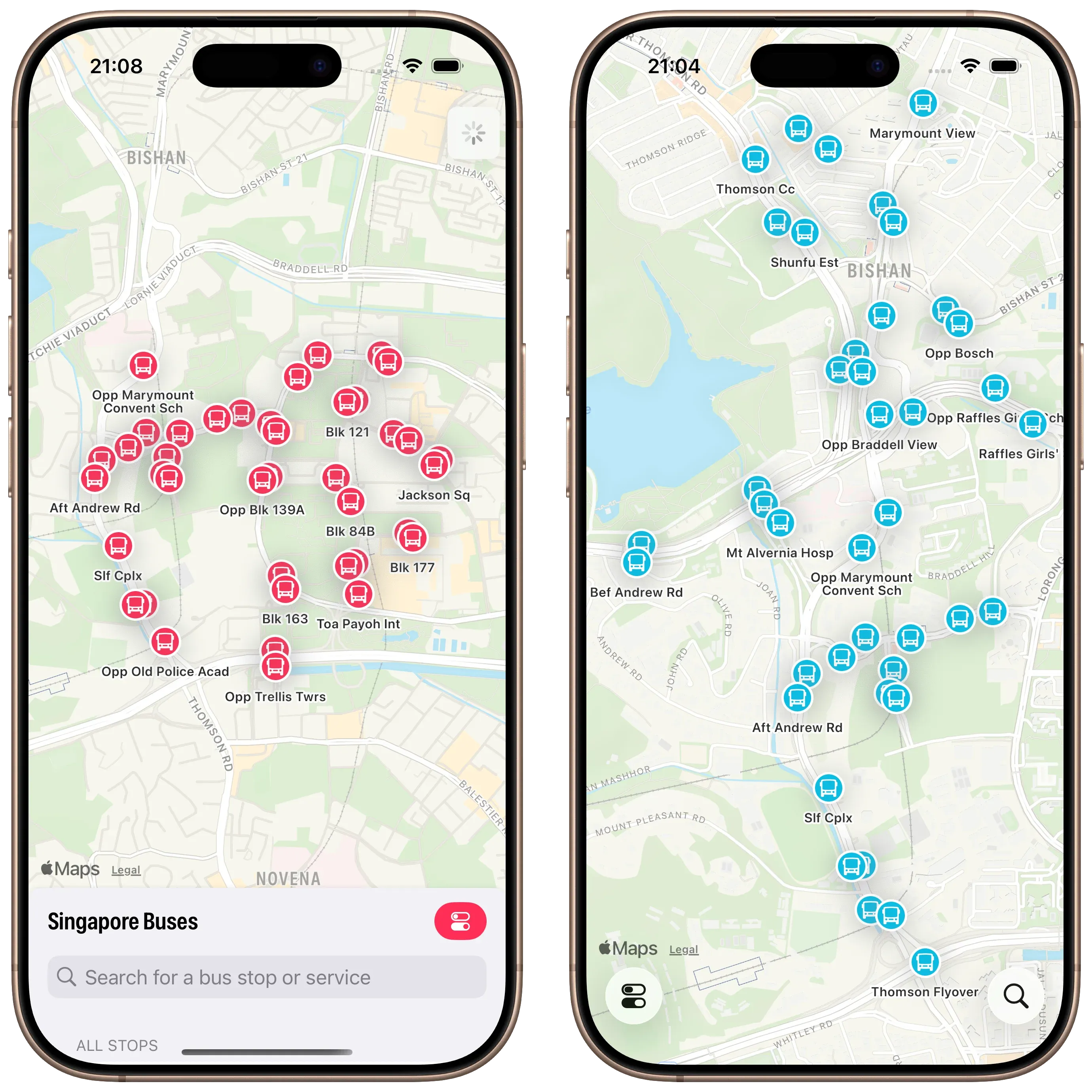
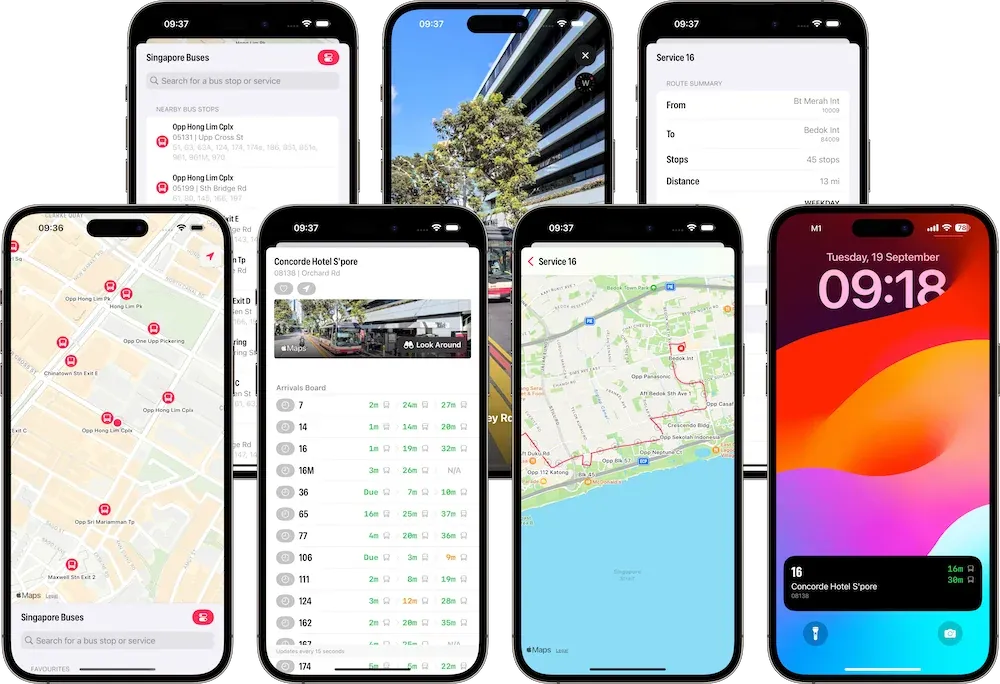
Screenshots showing Singapore Buses UI. Before and after

There are a few advantages to this approach.

First, there are more bus stops on the map *and *they update in real-time as you pan around the map1.

Second, although it’s not immediately apparent from the screenshot, the current version of Singapore Buses shows a janky animation when the Search view is moved to the medium detent—the map awkwardly re-centres itself during the transition. This is no longer a problem.

Third, *Search *only deals with bus stop search and favourites. *Settings *now lives on its own. It’s no longer sheet-on-top-of-sheet.

*Search *itself has been cleaned up.

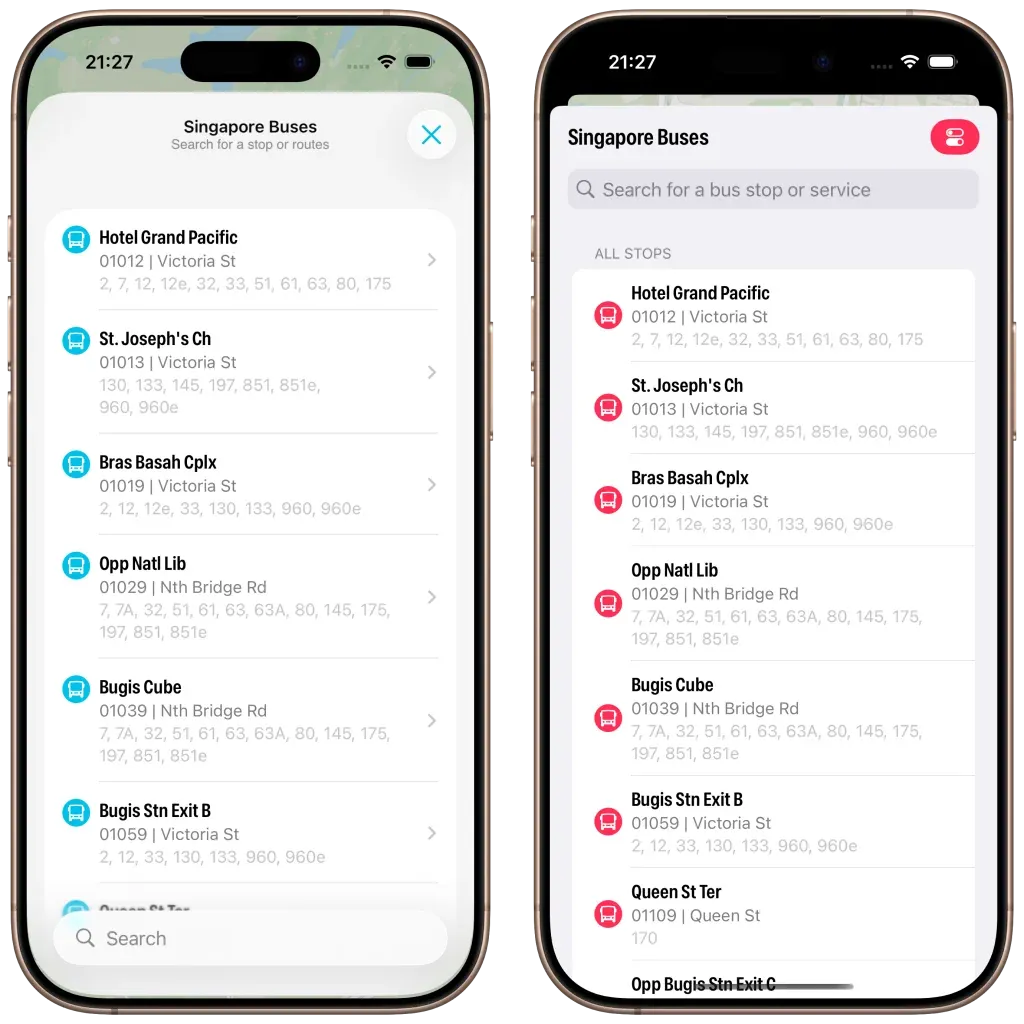
Screenshot of Singapore Buses search. Modern vs Legacy

The search bar now appears at the bottom, the background is now using materials (ultra thin in light mode; ultra thick in dark mode). I’ve also changed the bus stop icon to align to the top and I’ve adopted navigation bar subtitles.

However, what really strikes me about the above screenshot is how much *less *content is available due to the larger cell margins. In iOS 26 you can see six bus stops vs. seven bus stops (plus the name of the eighth) on iOS 18. It’s not a complaint, I do prefer the look of iOS 26.
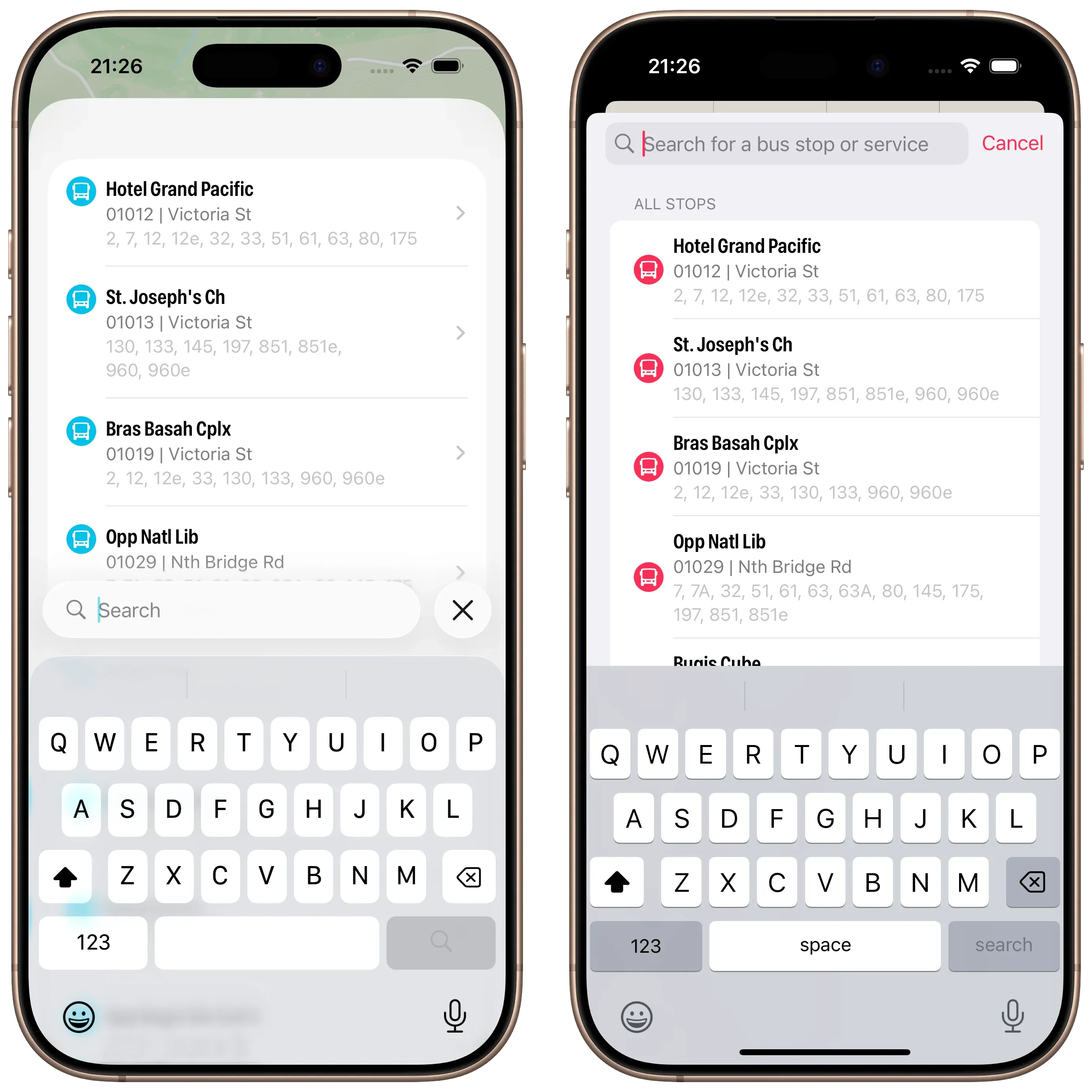
Screenshot of Singapore Buses Search with keyboard enabled. Search with Active Keyboard

Lastly, a look at Search with the keyboard activated. No changes here made by me, but I do prefer the look of the translucent keyboard with the search bar sitting on top.

Abandoning Tab Bars

When I started writing this article last week I was well on my way to adopting a Tab Bar and not a Toolbar. After a few days of testing I was pulling my hair out:

  • On my Map tab I was using a tabViewBottomAccessory to show the nearest bus stop to the user—to give them an easy way to tap and show arrival information. However, the accessory was available across all tabs where it made no sense (like Settings). Trying to hide the accessory (using EmptyView) when the selected tab wasn’t the map worked, but navigating back to the map caused the map to stop extending into the safe area, resulting in a lovely white bar along the top.2
  • Then there was the *Search *tab. It had a search bar that was fighting for space with other tabs, the tab bar accessory, and moving around based on scrolling actions. (Yes, you can control that to an extent, but is any of this tab bar behaviour a good idea in motion?)

So, the trusty toolbar has won out. Next up: redesigning *Settings *and Arrivals.

Redesigning the Arrivals view and Settings coming up next.

  1. In the live version of Singapore Buses bus stops only appear once you’ve stopped panning. ↩

  2. FB18767040 ↩

The Curious Case of Missing Mastodon Verification

The Curious Case of Missing Mastodon Verification

Verifying yourself on Mastodon is quite simple: just add the following to the <head> tag of your website:

<link rel="me" href="https://mastodon.instance/@username"/>

Then, add your website to your Mastodon profile, and you should be good to go.

That wasn’t the case for me.

I added the above link to the header—nothing. I added it to the footer—still nothing. I even tried adding the <a rel="me"...>version as a navigation link in both the top and bottom menus. No luck.

I left it overnight. Still no change.

Then I thought: If I’ve added my website to my Mastodon profile, I should at least see a Mastodon user-agent in the Apache logs. So, I re-added the website to my profile and checked again. Nothing.

Huzzah! A clue.

A quick check in Cloudflare revealed the issue: I had enabled Bot Fight Mode. I disabled it, checked the Apache logs again, and immediately saw Mastodon requests:

[10/Jul/2025:14:22:51 +0000] "GET /wp-json/activitypub/1.0/actors/0/followers HTTP/1.1" 200 4251 "-" "Mastodon/4.4.1 (http.rb/5.3.1; +https://indieweb.social/)"

Shortly after that, my website was verified.

So, I Switched (Back) To WordPress

So, I Switched (Back) To WordPress

After around six years dabbling with Ghost and static site builders I’ve migrated back to WordPress.

First impressions of the wp-admin panel were ā€œmehā€. It’s not really changed in the last few years and it’s really not as nice as Ghost’s admin panel. It does the job, though.

The Gutenberg editor, however, is amazing. It’s such a massive improvement—at least from memory—over the old WYSWYG editor.

To get things just so, I’ve had to install a few plugins:

  • Yoast SEO

  • Advanced Custom Fields

  • I’ve created an external_url field so that I can use it in the JSON feed 1.

  • JSON Feed (by Manton Reece and Daniel Jalkut)

  • Code Block Pro

  • Secure Passkeys

  • Various plugins to add Fediverse tags to the <head> element

  • ActivityPub

To get footnotes to render correctly in RSS readers—i.e., appear as pop-ups—I’ve added the below code to functions.php:

functions.php
function clean_gutenberg_footnotes_for_rss($content) {
if (!is_feed()) return $content;
$refIndex = 1;
$uuidToIndex = [];
// Step 1: Replace <sup> references with numbered links and track mapping
$content = preg_replace_callback(
'/<sup data-fn="([^"]+)" class="fn">\s*<a[^>]*>(\d+)<\/a>\s*<\/sup>/i',
function ($matches) use (&$uuidToIndex, &$refIndex) {
$uuid = $matches[1];
if (!isset($uuidToIndex[$uuid])) {
$uuidToIndex[$uuid] = $refIndex++;
}
$n = $uuidToIndex[$uuid];
return "<sup id=\"fnr-{$uuid}\"><a href=\"#fn-{$uuid}\">{$n}</a></sup>";
},
$content
);
// Step 2: Rewrite footnote section and replace ↩ links
$content = preg_replace_callback(
'/<ol class="wp-block-footnotes">(.*?)<\/ol>/is',
function ($matches) use (&$uuidToIndex) {
$footnotes = $matches[1];
preg_match_all('/<li id="([^"]+)">(.*?)<\/li>/is', $footnotes, $liMatches, PREG_SET_ORDER);
$output = '<div class="footnotes"><ol>';
foreach ($liMatches as $li) {
$id = $li[1];
$rawText = $li[2];
$n = $uuidToIndex[$id] ?? '?';
// Replace ↩ <a> link with formatted Unicode arrow link
$fixedText = preg_replace(
'/<a[^>]+href="#' . preg_quote($id, '/') . '-link"[^>]*>.*?<\/a>/is',
'<a href="#fnr-' . $id . '" class="footnoteBackLink" title="Jump back to footnote ' . $n . ' in the text.">ā†©ļøŽ</a>',
$rawText
);
$output .= '<li id="fn-' . esc_attr($id) . '"><p>' . trim($fixedText) . '</p></li>';
}
$output .= '</ol></div>';
return $output;
},
$content
);
return $content;
}
add_filter('the_content', 'clean_gutenberg_footnotes_for_rss');

  1. I’ll add it to the RSS xml feed soon. ↩

Singapore Buses 2025.6.1

Singapore Buses 2025.6.1

Singapore Buses 2025.6.1 is now available in the App Store. There are no user facing changes in this release, but here’s a rundown of what has changed:

  • Uses a new version of the Singapore Buses API (which paves the way for a much larger update later in the year)1
  • Removes Google Firebase
  • Reduced the download size by approximately 3MB

If you enjoy using Singapore Buses, try the premium features available with Singapore Buses+2.


  1. The server-side app is now written in Python and uses the FastAPI framework. ↩

  2. Live Activities, app themes, and advert removal. ↩

I’ve Got Better Things To Do Than This, and Yet

Louie Mantia:

To me, modern UI isn’t getting out of the way, it’s often asserting itself over the content it claims to get out of the way of.

In Liquid Glass, there are obvious places where this is absolutely true—the big Play/Pause button in Quicktime being an example.

We’re only on beta 2, but there’s so much to refine between now and September.

Summer Plans

Summer Plans

Like other developers, I’ve spent a few weeks with Apple’s new Liquid Glass design language. In some areas, I think it’s tremendous: the macOS dock, iOS folders, text selection hover effects on iOS, and the new sidebars are standout elements. In other areas, it’s middling: toolbars and tab bars that don’t update quite in *real-time *as advertised leave the UI looking out-of-sync with the underlying content. And, the final bucket, where it’s rubbish: clear glass icons.

My working assumption is that the rough areas will be smoothed out over the next few months.

So, on to the plans:

Singapore Buses

  • Singapore Buses is currently on v2025.5. There may be a few summer updates to keep the bus stops and routes current.

  • Singapore Buses v2026:

  • Will target iOS 26

  • Will have Liquid Glass UI (I am experimenting with toolbars, tab bars, and more…)

  • Will have new server-side code (written in Python)

  • Will, tentatively, drop Core Data (which has been the biggest source of crashes)

NetNewsWire

  • Refresh the macOS and iOS UI.

  • No new features (except the NetNewsWire About panel on macOS)

Untitled Flag Quiz

  • A long time ago, in a coding language far far away (Objective-C), I wrote an app to teach my nephews about world flags
  • Said nephews are now adults, but I’ve been asked to bring back the app
  • Thing is, I don’t have the source code from that original app
  • Thus, build from scratch or build from prompts? Let’s see

'Apple to face court over claims it overcharged UK users on App Store'

Raphael Boyd, The Guardian:

The claim is being brought against the company by Dr Rachael Kent, an academic at King’s College London, on behalf of herself and about 19.6 million other iPhone and iPad users in the UK. … ā€œThis is the behaviour of a monopolist and is unacceptable. Ordinary people’s use of apps is growing all the time, and the last year in particular has increased our dependence on this technology. Apple has no right to charge us a 30% rent for so much of what we pay for on our phones – particularly when Apple itself is blocking our access to platforms and developers that are able to offer us much better deals. This is why I am taking this action.ā€

Singapore Buses has a monthly in-app subscription that costs users Ā£0.99, of which I receive Ā£0.70. Here’s the thing, though: I set the price, not Apple. If Apple decided it was going to remove its 30% commission—a commission that is charged to developers, not end users—I’d still set the price at Ā£0.99, because it’s* *only Ā£0.99.

Enabling Screen Recording on the Wahoo ELEMNT ACE

Enabling screen recording requires the installation of third party software. These instruction are for the Mac. Proceed at your own risk.

Here’s what you’ll need:

  • A Mac (Apple Silicon or Intel will do)
  • The OpenMTP application
  • A USB-C cable

First, install OpenMTP. This can be done in two ways:

  • Download and install the appropriate Apple Silicon or Intel version of OpenMTP from the website; or,
  • If you have brew installed, run brew install openmtp --cask which will download the application and install it for you.

Second, connect your Wahoo ELEMNT ACE to your Mac by following these instructions:

  • Connect one end of the USB-C cable to an available USB-C port on your Mac and the other end into the USB-C port on your ACE. Turn the ACE on (if it is off).

**Third, **open the OpenMTP app from Applications.

  • On the right-hand side you’ll see the folders currently available on your ACE.
  • Your only task is to create a new folder called capture.

**Lastly, **disconnect the ACE from the Mac, reboot the ACE. At the bottom of the *Device Settings *page on the ACE you’ll have a new Screen Recording tool.

To extract recordings from the ACE, connect the ACE to the Mac, open up the capture folder in OpenMTP, and then drag the recording from the right-side to the appropriate folder on your Mac on the left-side of the app.