I received an email from SHIMANO at the end of March announcing the termination of their cycling training platform, CONNECT Lab:
We regret to inform you that the SHIMANO CONNECT Lab will end on March 31, 2027.
Prior to the end of the service, certain functions will no longer be available according to the schedule below.
• End of Availability for Certain Features
As of May 26, 2026, the activity transfer function from E-TUBE RIDE to SHIMANO CONNECT Lab will no longer be available.
• Scheduled End of Service
March 31, 2027
As an owner of a SHIMANO power meter, this is disappointing. While many of the analytical services offered by SHIMANO CONNECT Lab are available via Garmin Connect, Strava, and Intervals, none of those services support Force Vector analysis, which is one of the primary functions of the product. I even went so far as to download GoldenCheetah but this appears to be a hot mess that doesn’t want to run on macOS 261.
Force Vector analysis
Strangely, I can’t find any public mention of this termination on the SHIMANO website. SHIMANO, shamefully, seems to be leaving their customers in the lurch.
It’s not notarised and required special permissions to run via Settings -> Privacy. Once those permissions were granted, it still didn’t launch because it couldn’t “find the R libraries”. ↩
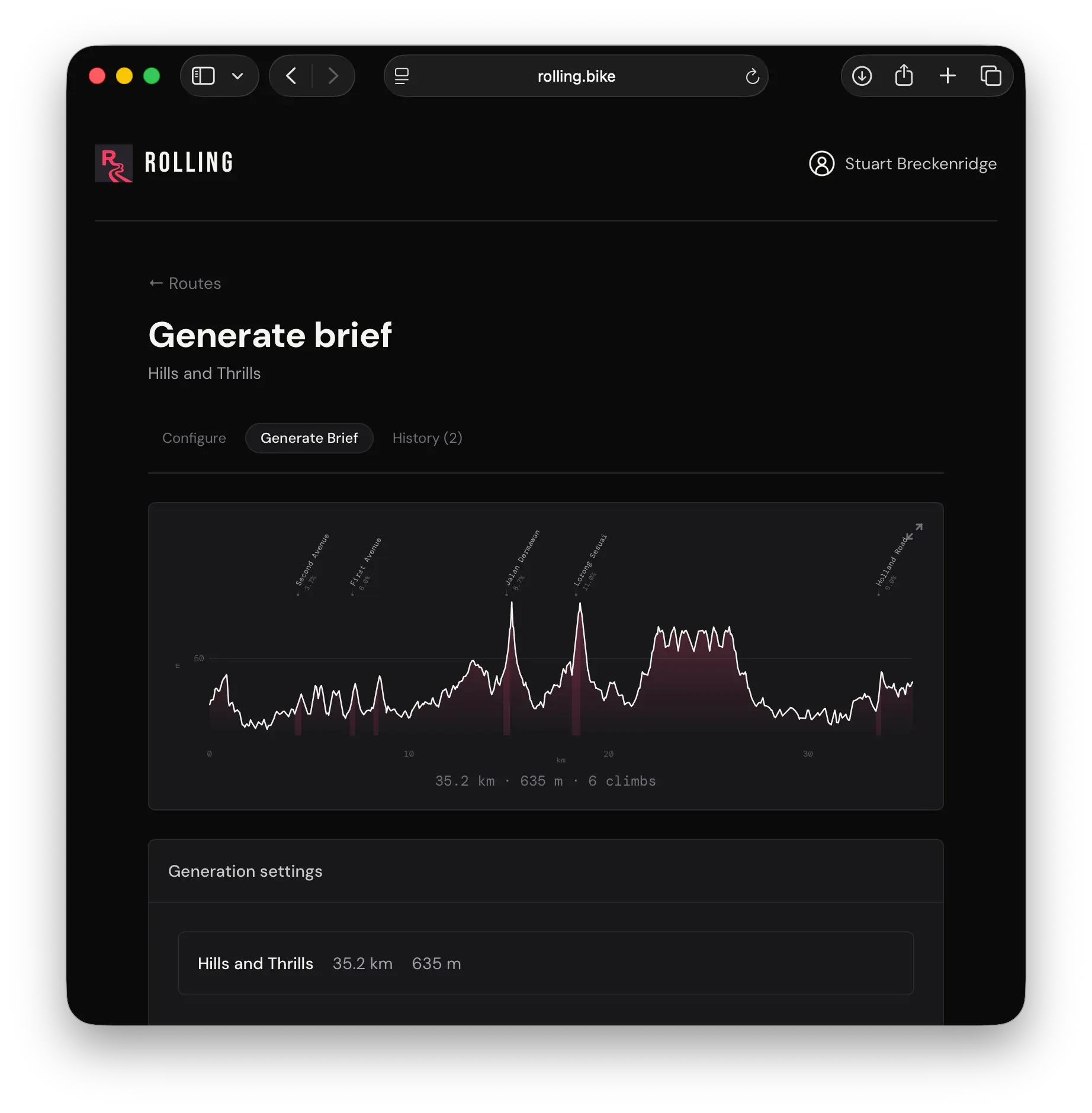
A useful new web app for generating ride briefs is now available at the brilliantly named rolling.bike. Upload your GPX file, or sync your routes via Strava or Ride with GPS, provide some context and Rolling will generate a well structured ride brief.
Here’s a walked through example:
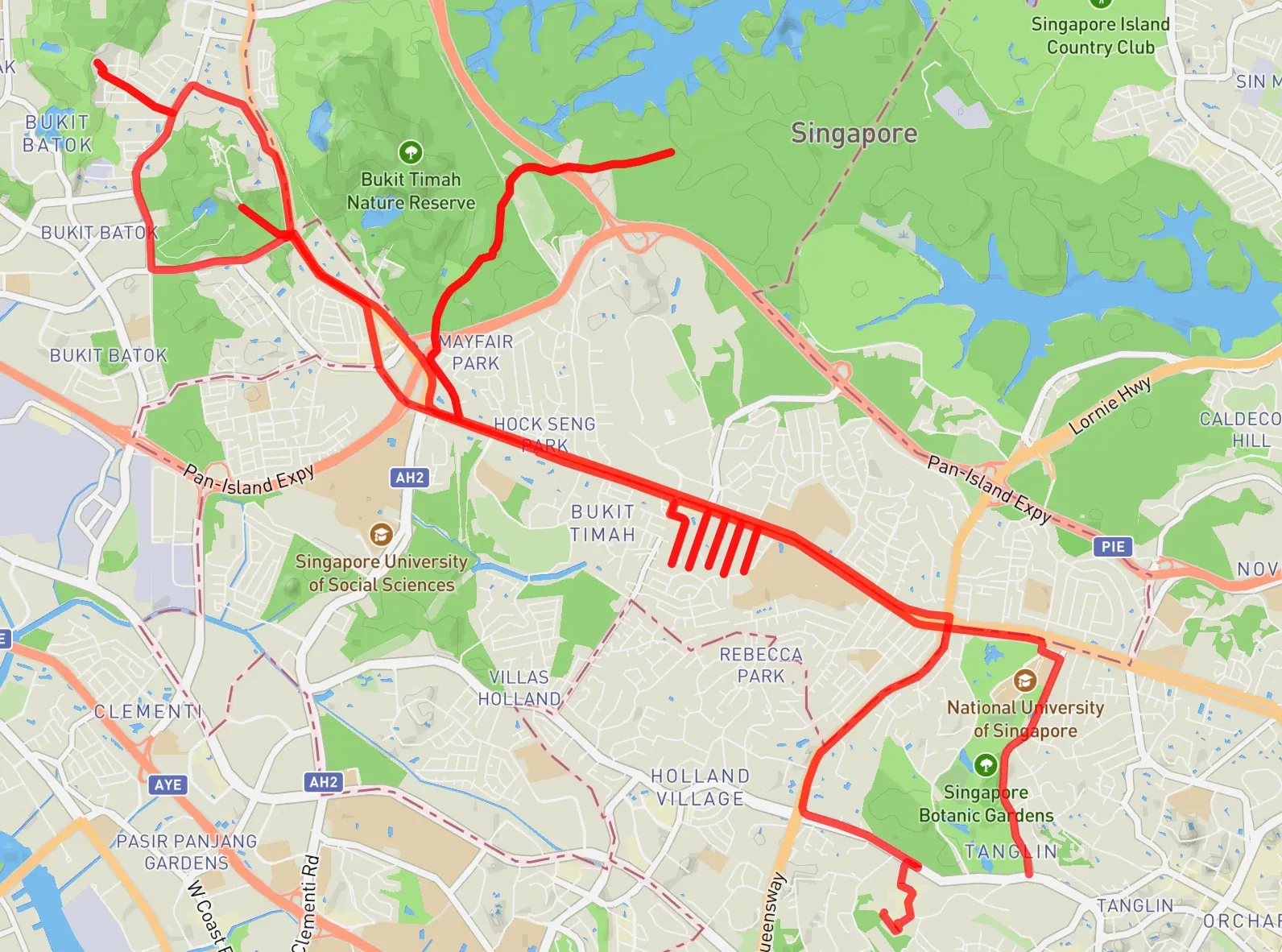
The GPX file
A quick summary of this route:
Start at Botanics
The hilly comb of First-to-Fifth Avenue
Hillview
Lorong Sesuai
Rifle Range Road
Finish at Dempsey at the bottom of the map
Information I provided to Rolling:
Route Name: Hills and Thrills
Category: Steady (2.0 - 2.8 W/kg)
Named Start and End points
Rider Notes:
New Rider Instructions: Lots of short and snappy hills.
Self sufficiency note: Two bottles. One gel.
With that information, Rolling can output various lengths of brief: Regular, Event, or WhatsApp, depending on your selection. In addition, you can pick your brief’s tone (I use cheeky). With the above information, the Regular output for this ride:
Hills and Thrills is exactly what it says on the tin, a fun steady-paced loop round some of the nicer parts of the island. It’s 35.2 kilometres with 635 metres of climbing spread across six proper little kicks, so you’ll get a proper workout but nothing that’ll have you gasping for air round every corner.
This ride is for anyone who fancies a morning out with decent scenery and a few punchy climbs to keep things interesting. We’ve got regroup points dotted through the route, so you can catch your breath and stay together as a group. No heroics required.
The climbs are all short and snappy. Haunted Hill at 14.7 kilometres in is probably the meanest of the lot at 8.7 per cent, but it’s still only 300 metres of pain. Lorong Sesuai later on is similarly spicy at 11 per cent but equally brief. First Avenue and Bukit Timah Road will warm you up early doors, nothing outrageous but enough to let you know your legs are switched on.
You’ll be self-sufficient out there, so bring two bottles and a gel to keep the tank topped up. A spare tube and pump are non-negotiable, as is the usual common sense.
We’re starting at Singapore Botanic Gardens Tanglin Gate on Saturday 7 March at 6am. It’s an early one but worth it for the cooler morning air and quiet roads. We finish at Burnt Ends Bar on Dempsey Road, where we’ll sort out proper breakfast and a coffee that’s actually worth drinking.
Should be a cracking morning.
The Event brief:
This is a steady ride built around short, punchy climbs that’ll keep things interesting without requiring you to sell a kidney. We’re looking at 35 kilometres with 635 metres of elevation crammed in, which is basically Singapore’s way of testing whether you can handle variety on a bike.
We’ll start at Tanglin Gate in the Botanic Gardens and head into familiar territory. The climbs here are properly bite-sized. You’ve got Jalan Dermawan, which is steep enough to remind you that you have legs, and Lorong Sesuai sits in there with a bit of attitude at 11 per cent average. Holland Road rounds out the main event near the end. Nothing’s long enough to really damage you, but they’re all short enough that you have to actually pedal properly.
This isn’t a race, so we’ll regroup sensibly at the bottom of anything notable. Keep things social on the flats, push on the climbs, and try not to look too smug when you get to the top. We’re aiming for around two hours ten minutes of riding, which gives us time to chat, recover between efforts, and generally not take ourselves too seriously.
The route loops us back through some nice sections, so there’s rhythm to it. Early on you’ll pass through Avenues One to Five before heading out toward the real climbing. Bukit Timah Road gets involved early, then we settle into the longer middle section where Jalan Dermawan and Lorong Sesuai are waiting to have their say.
Bring two bottles and a gel minimum. There aren’t convenient shops along the way, so come prepared to look after yourself. Water stops are on you.
We’re finishing at Burnt Ends Bar on Dempsey Road, which is a proper reward for a solid morning’s work. Coffee, food, legs that feel like they’ve done something worth doing. That’s the deal.
See you Sunday morning. And no, you don’t need to be elite to ride this. Just show up with a bike that works and legs that are willing to go up hills a few times.
And finally, the WhatsApp brief:
Saturday 7 March, 6am sharp from Tanglin Gate. We’re doing Hills and Thrills, 35 km of the sort of climbing that keeps you honest. Plenty of short punchy hills that’ll test your legs but won’t bore you. Regroup spots at First through Fifth Avenue at the bottom, then Former Hillview and Lorong Sesuai at the top, plus Rifle Range Road at the end. Bring two bottles and a gel because we’re not messing about. Finish at Burnt Ends Bar, Dempsey Road.
The more you use Rolling the better it gets as it actually learns your tone!
It’s an extremely useful utility, and a bargain at $15 AUD a year.
Enabling screen recording requires the installation of third party software. These instruction are for the Mac. Proceed at your own risk.
Here’s what you’ll need:
A Mac (Apple Silicon or Intel will do)
The OpenMTP application
A USB-C cable
First, install OpenMTP. This can be done in two ways:
Download and install the appropriate Apple Silicon or Intel version of OpenMTP from the website; or,
If you have brew installed, run brew install openmtp --cask which will download the application and install it for you.
Second, connect your Wahoo ELEMNT ACE to your Mac by following these instructions:
Connect one end of the USB-C cable to an available USB-C port on your Mac and the other end into the USB-C port on your ACE. Turn the ACE on (if it is off).
**Third, **open the OpenMTP app from Applications.
On the right-hand side you’ll see the folders currently available on your ACE.
Your only task is to create a new folder called capture.
**Lastly, **disconnect the ACE from the Mac, reboot the ACE. At the bottom of the *Device Settings *page on the ACE you’ll have a new Screen Recording tool.
To extract recordings from the ACE, connect the ACE to the Mac, open up the capture folder in OpenMTP, and then drag the recording from the right-side to the appropriate folder on your Mac on the left-side of the app.
⚠️ This review reflects the features and fixes introduced in the ELEMNT WG29-300745 firmware, released on 19 December 2024.
My Garmin Edge 530 was a temperamental device. On more than one occasion it would freeze, reboot, and lose portions of a ride. Garmin rarely updated maps. And, for one reason or another, Edge devices have a user interface that is largely inscrutable.
For those reasons, I switched to a Wahoo ELEMNT ROAM v2. Despite having fewer features than the Edge, it excelled in its core functioanlity. Maps, navigation, and both the software and physical user interfaces were (and remain) superior to the Edge series in every way.
The challenge for the ACE is to best the ROAM. In some ways it does; but it others it comes up short.
ELEMNT ACE Setup, Wahoo App
Inside the rather spartan ELEMNT ACE box is the ELEMNT ACE, a USB-C cable, a mount with various fittings, a tether, and a selection of important manuals.
When turning on the ACE you’re greeted with the same 16-bit character that you see on the ROAM followed by a higher quality bike loading animation. You’re then invited to scan a QR-code and complete the setup process with the Wahoo app (not the ELEMNT app, which is being retired).
While setup was relatively smooth, I have had several ongoing connectivity issues with the Wahoo app (see Software Issues).
By moving device management from the ELEMENT app to the Wahoo app, Wahoo X*—your all-in-one membership for personalised, immersive workouts designed to make you a more complete athlete*—gets a more prominent push. You’ll see a raft of Wahoo X related workouts under your Recent Activities on the app. It’s not obstructive, but it’s not entirely welcome either, particularly for users who have been using the ELEMNT app exclusively.
ELEMNT ACE Hardware
Device Size, Materials
Physically, there’s no getting around the fact that the ELEMNT ACE is a big unit.
Device
Size
Weight
ELEMNT ACE
4.9 x 2.8 x 0.8in
208g
ELEMNT ROAM
3.56 x 2.34 x 0.8in
94g
ELEMNT BOLT
3.05 x 1.86 x 0.84in
68g
Edge 1050
4.7 x 2.4 x 0.6in
161g
Edge 840
3.4 x 2.3 x 0.8in
84.8g
Edge 540
3.4 x 2.3 x 0.8in
80.3g
The size of the device will pose a problem for current mounts.
You need at least 2.6in between the centre of your mount and the handlebars to allow for a clean rotation. I’m using the large (pre-ACE) variant of this Framesandgear mount and it has just less than the 2.6in clearance required. Luckily, the ACE has a rubberised edge that lets it rotate into place with a bit of force.
Mounts need to be able cope with the weight of the ACE and any other devices you have mounted. This hasn’t been a factor in my rides as the mount is aluminium and can cope with both the ACE and a BOOKMAN Volume 1500 front light.
Touchscreen, Physical Buttons
The new screen is a significant improvement over the ROAM. It’s brighter, clearer thanks to the higher resolution, more colourful as a result of the expanded colour range, and, while it’s a touch screen, it’s not smartphone quality in terms of responsiveness. Swiping left and right works as you’d expect but it’s slower to respond to those gestures than a modern phone. That said, swiping left to go back a page instead of having to cycle through all configured pages is a frustration-busting win.
There is welcome consistency in the ACE’s physical button layout as it is the same configuration available on the ROAM—we want things to be better, but we don’t them to be different. Brooking no argument, physical buttons are a necessity in rainy weather.
Strangely, while Wahoo has slimmed the bezels on the sides and the top—there are no LEDs on the ACE—the bezel between the bottom of the screen and the bottom button array is huge. I assume there’s a good reason for its existence because it’s really quite ugly.
Battery Life
Wahoo advertises the ACE’s battery life as lasting up to 30 hours under optimal conditions*. *That claim is only achievable if you use the 5-second backlight timeout mode. On early morning rides, when it’s dark and the display needs constant backlighting, that mode is unusable as the screen is unreadable when the backlight is off.
I have been using the stock *Auto *setting—to my eyes, I haven’t seen the backlight turn off or go below 100% brightness—and after several two-hour rides the battery is consistently in 85-88% range (only slightly less if screen recording is active). Assuming a linear depletion all the way to 0%…that’s ~17 hours.
Enabling Screen Recording
If you want to enable screen recording on your ELEMNT ACE, see this post for instructions.
Is 17 hours OK for a bike computer? I think so. Only on very rare occasions would you be in the saddle for that amount of time.
The Mount
The aluminium mount provided is of high quality. I’ve attached it to my city bike and it performs well with no discernible shakes, creaks, or anything else that would cause concern.
ELEMNT ACE Software
Wind Dynamics
The ACE comes with a wind sensor that is designed to measure headwind and tailwind. The theory (courtesy of Wahoo):
When coupled with bike speed (‘regular’ speed) data, the ACE can estimate the approximate speed impact of wind conditions (headwind, tailwind, or drafting benefit) and present a Wind zone –
**AirBoost **(Heavy (dark green) / Light (light green))
When bike speed is aided by a tailwind or reduced air resistance from drafting behind another cyclist
Bike speed is > Air speed
**Neutral Air **(blue)
When there is little to no headwind, tailwind, or draft benefit
Bike speed is = Air speed
AirDrag (Heavy (red) / Light (orange))
When bike speed is hindered by a headwind
Bike speed is < Air speed
In practice, it works broadly as advertised. Leading at the front of a pack, or when you’re on your own, you’ll generally see Neutral Air or *AirDrag (unless you have a tailwind); *whereas if you tuck in behind you’ll generally see *AirBoost. *If you tuck in behind, and there’s still a strong headwind, you’ll now have the *AirDrag *data to prove it. (If you’ve been out on a fast ride and most of the data is AirBoost then that indicates strategic thinking and laziness.)
Though the Wind Dynamics data is included in .fit files, no third-party I am aware of (e.g., Strava, intervals.icu) is using it. For the moment, beyond seeing the benefits of being closer to the rider in front of you via the ACE or the Wahoo app, there’s not much more you can do with this data right now. (I have rolled my own clunky solution to get Wind Dynamics data from Wahoo to Strava.)
Workout Pages
Workout pages are, broadly speaking, a huge improvement over the ROAM. Data fields are crystal clear thanks to the larger, higher resolution screen. (Tip: if you’ve configured 11 data fields and you’re wondering why you’re seeing less than that on screen, use the physical up and down buttons on the side of the device to display more or fewer fields.)
Similar to the ROAM and the BOLT, workout pages continue to be to configured via your smartphone. I don’t understand why this needs to be the case: the ACE has a touchscreen bigger than the original iPhone, why do I need a second device to configure it?
Connectivity Dashboard
The new Connectivity Dashboard is a solid step-up from previous models. Each connected device has its own logo and you connect to a new device by tapping the + button.
Maps
As you’d expect, maps look much better on the ACE than they do on the ROAM or the BOLT. They have a higher resolution, a wider range of colours, smoother animations, and support pinch-to-zoom and panning via the touch screen. Map layers can also be added or removed: Points of Interest, Custom Waypoints, Street Names, Wind, Summit Segments, and Strava Live Segments.
The ELEMNT ACE has 64GB of storage and, by default, all maps are installed, leaving around 6GB of free storage.
Sounds, Alerts, and the Bell
As I have a Garmin Varia radar as my rear light, there’s usually competition for what audio the device should be playing: traffic alerts or navigation alerts, or both at the same time. If you leave the settings at their default, then the *audio mix *when you’re out on a ride is similar to that of the ROAM. However, the ACE comes with some new features not heard before in a Wahoo device: voice-based turn-by-turn directions and a bell.
The voice-based turn-by-turn directions are good if there’s no headwind. It really doesn’t take much for the voice audio to become inaudible when you’re travelling at speed. (I’ve gone back to using tone-based navigation alerts.)
The best feature is the bell. Double-tap (almost) any of the data screens and the bell will sound. It’s useful when you’re on slower rides, on pavements with pedestrians, or you’re overtaking someone and want to give them a cheeky ring. You cannot double-tap the map to ring the bell.
Strava Live Segments
Strava Live Segments, added in 19th December firmware update, work as you’d expect. As you approach a segment, the ACE will automatically move to the Live Segment page and/or keep you updated on segment progress on other pages, dependent on your configuration.
If you’ve somehow got time to focus on it, there’s a nice animation along the bottom of the screen with your current position, your current PR, and the current overall best time.
Strava Live Segments | Wahoo ELEMNT ACE Beat my own PR…miles behind the best time.
GPS Acquisition
I’ve always found Wahoo devices glacially slow when acquiring a GPS-lock. Unfortunately, the ACE does nothing to rectify this. Starting a ride from the same position on three different days, the lock time in comparison to other computers is abysmal:
Device
GPS-Lock Time
ELEMNT ACE
33 – 45s
ELEMNT ROAM v2
19 – 22s
Edge 530
8 – 12s
I’m sure this can be improved through firmware updates. Crucially, GPS accuracy is excellent (though the below screenshot is also applicable to the ROAM).
Screenshot of ELEMNT ACE GPS trace.
Software Issues
It’s not quite death-by-a-thousand-cuts, but there are issues.
Setting up data fields via the Wahoo app is either close to instantaneous or requires you to make several changes before they are synchronised and the ACE displays them.
I wanted to update my data fields when I was out on a ride, but the Wahoo app demanded that the ACE was connected to WiFi to check for updates before it would do anything.
Sometimes the Wahoo app will upload workouts to Wahoo Cloud when WiFi isn’t available, other times it won’t and you need to connect to WiFi before it will sync. On one occasion, an error message appeared stating: “sync failed, please contact support”.
Wahoo Live Track is inexplicably missing in action. It should be considered a universal embarrassment for a flagship device to launch with fewer safety features than its predecessor.
While you cannot filter routes, you can search for them using the on-screen keyboard. Unfortunately, the keyboard has a habit of dismissing itself while you’re typing.
On one ride, the Connectivity Dashboard wouldn’t dismiss.
The Shimano Force Vector page *still *has no dark mode.
Final Thoughts
While others will baulk at the size of the ACE, the only problem I have with the hardware is the bottom bezel. I would have gladly sacrificed a bit of battery life for a longer screen and a slimmed bezel. Everything else: increased screen real estate, resolution, and colours are all welcome improvements over the ROAM, and a solid response to the Edge 1040/1050.
Software-wise, there are simply too many issues for a device that costs €599. The silver lining is that software issues can be fixed and Wahoo does have a track record of keeping their devices updated.
Lastly, Wind Dynamics, worth it? *Not yet. *On-device, it needs to do more than it currently does; while off-device, the data needs to be utilised in more places than it currently is (Wahoo only right now).
If you want a ROAM with a bigger and better screen, I’d wait a few months to let the software in the ACE stabilise before making up your mind. Whether Wind Dynamics develops into a must-have feature is anyone’s guess.